Built in Germany, hosted in the EU
Every lead. One place. Finally clear.
LeadList collects every enquiry from every website into a pipeline your team reads at a glance. Drag leads through your stages, keep every conversation on the record — hosted in line with the GDPR, built in Germany.
No credit card, no sales pitch — we set up your workspace and you look at your own real data.
- 1 pipeline
- instead of spreadsheets, inbox and chat
- 5 minutes
- from web form to first lead
- 0 trackers
- no analytics cookies, no third-party scripts
- 100 % GDPR-compliantData protection designed in from the start
- Made in GermanyBuilt and supported in Germany
- Hosted in the EUYour data never leaves the EU
- DPA includedData processing agreement under Art. 28 GDPR
- No tracking cookiesNo analytics, no externally hosted fonts
The problem
The enquiries arrive. Then what?
Most teams do not lose leads because they have too few — they lose them because nobody can say where a given lead stands right now.
Spread across five tools
The contact form sends an email, a colleague notes something in a spreadsheet, the rest lives in a group chat. Nobody holds the whole picture.
Nobody knows whose turn it is
Asking whether anyone has called yet costs time every single day — and when in doubt either nobody calls or two people do.
Enquiries quietly go cold
A lead that sits in an inbox for two weeks is no longer a lead. Without visible stages you only notice once it is too late.
One pipeline anyone can read immediately
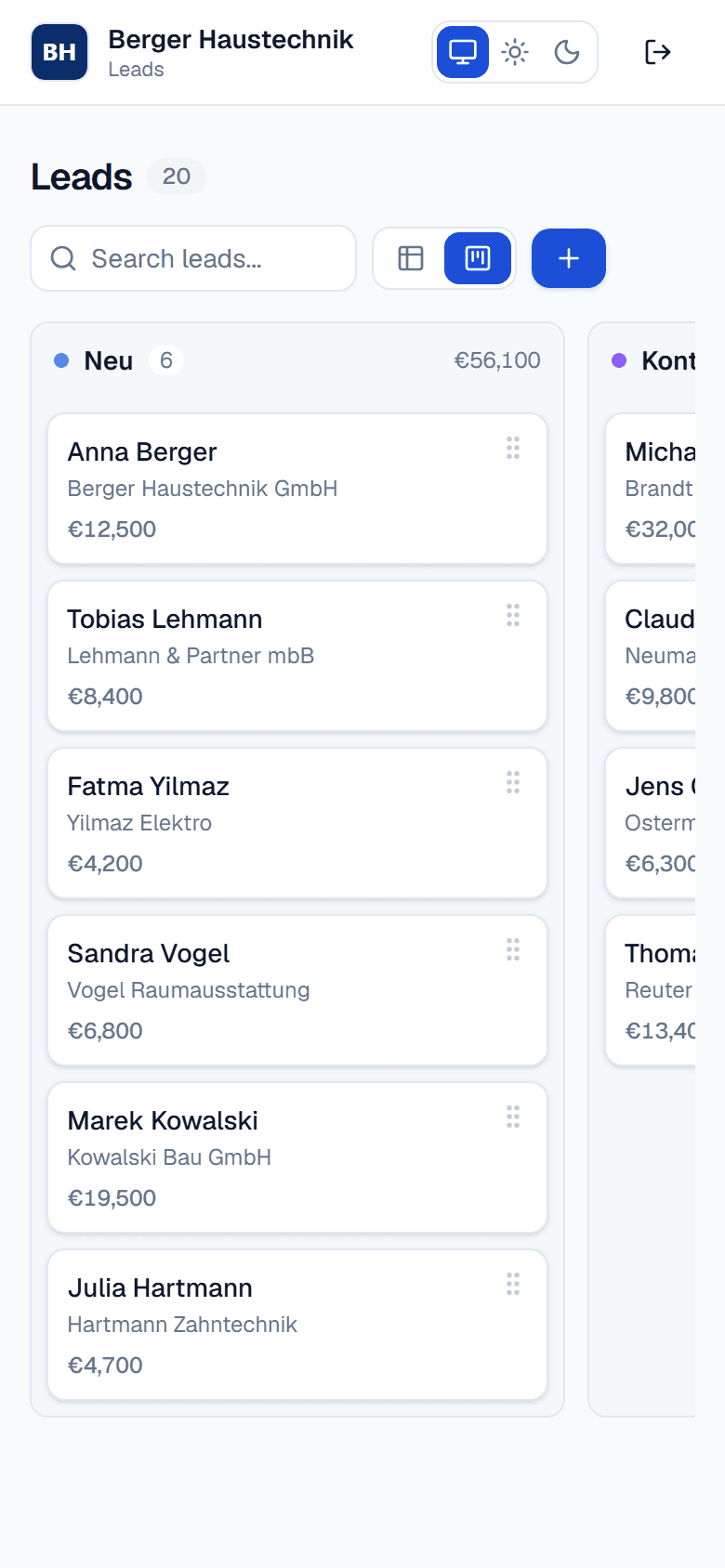
LeadList gives every lead a visible place. Each enquiry lands in your first stage automatically, every step is a card you move, every conversation sits on the lead as a note. Open the board and you know within five seconds what needs doing today.
- Every enquiry lands in your pipeline automatically — no copy and paste
- You decide the stages, their colours and their order
- Notes stay on the lead, not in one person's inbox
- Every client gets their own strictly separated workspace
Features
Everything you need to follow up — and nothing beyond that
Not a bloated CRM with 200 fields nobody fills in. LeadList does one thing: keep enquiries visible until they have turned into customers.
Kanban with drag and drop
Drag leads across your stages. The order within a column is preserved and saved for everyone straight away.
Table with instant search
The same data as a sortable list. Type a name, a company or an email address — filtering happens as you type.
Notes timeline
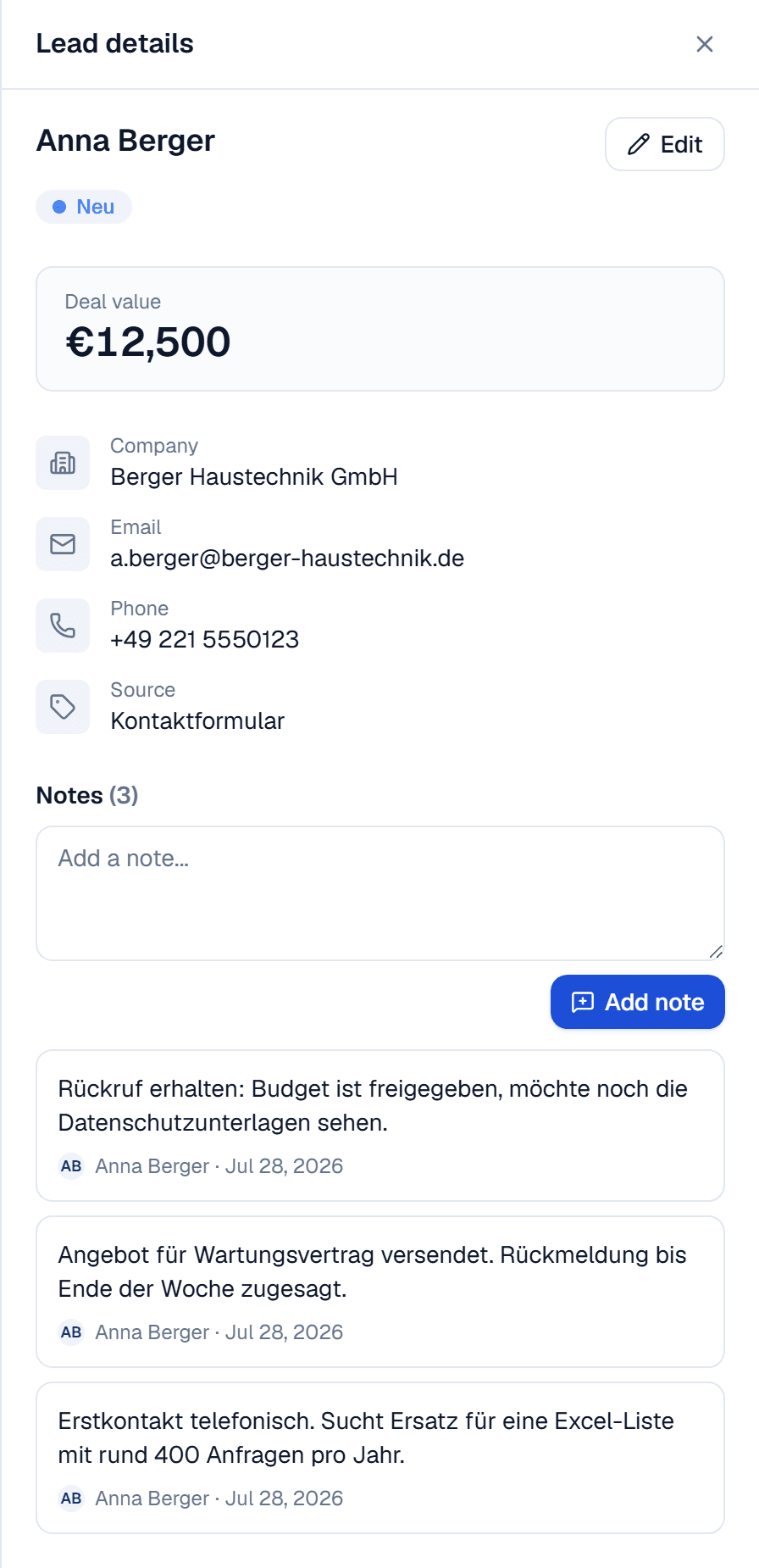
Every call, every commitment right on the lead, with author and timestamp. The history stays even when colleagues move on.
Your own pipeline stages
Add, rename, recolour, reorder, delete — per client. Your stages carry the names your team actually uses.
Custom fields
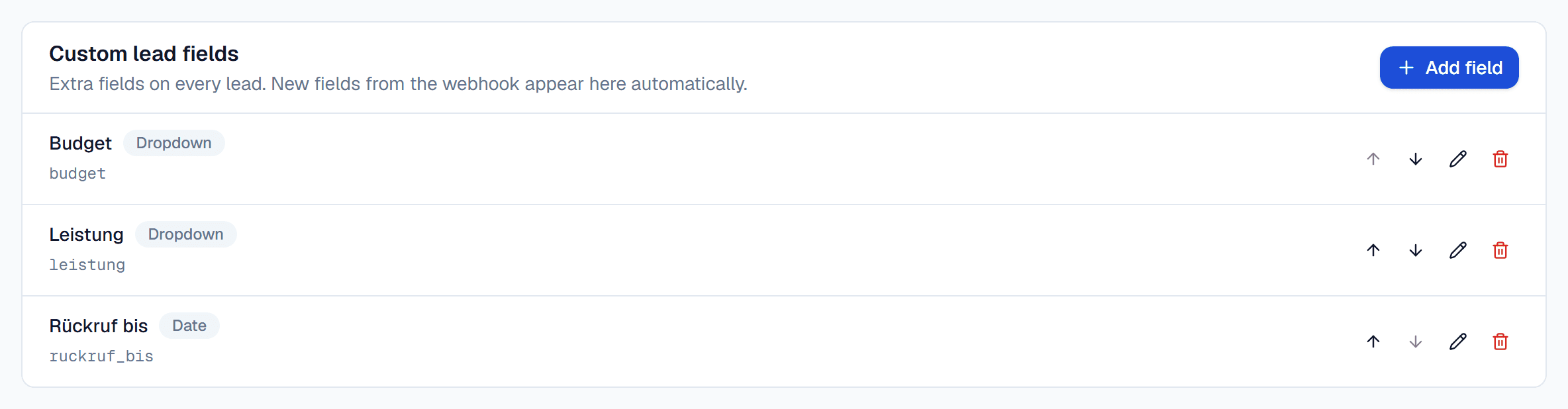
Text, number, date, dropdown or checkbox. Defined in the admin console, visible in the form, the detail view and the table.
Lead webhook
A dedicated, rotatable address per client. Elementor, Bricks or your own React form post straight into it.
Strict tenant isolation
Each client sees only their own leads. The separation happens centrally in the data layer, not just in the interface.
Your logo, light and dark
Your logo in the workspace header. Light, dark or follow the system — the choice is remembered and never flashes on load.
The pipeline
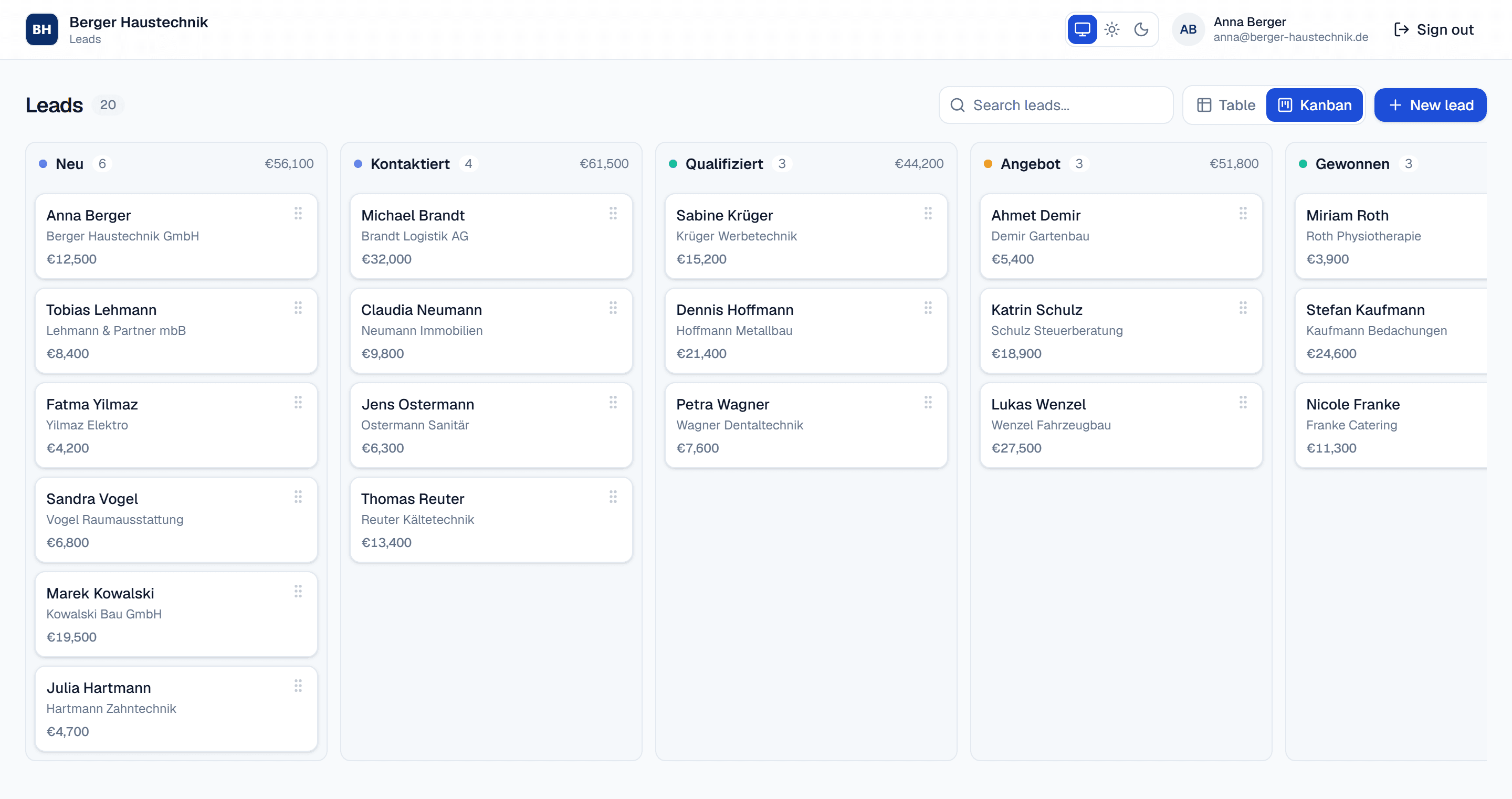
A board shaped like your sales process
Stages are your decision, not ours. Create as many as your process needs, give them your names and colours, and order them the way you actually work. Clicking a card opens the lead with every field and the full note history.
- Drag cards between stages — saved immediately
- Order within a stage stays exactly as you arranged it
- Create, rename, recolour, reorder and delete stages per client
- Switch between board and table without losing your context
Integration
Keep your form. Drop the detour.
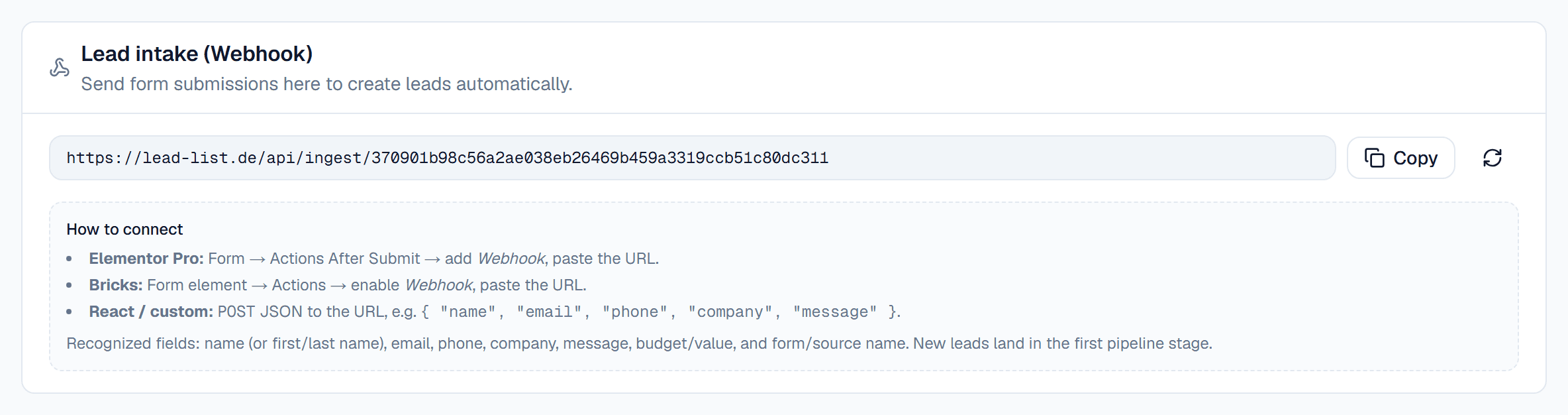
Every client gets their own webhook address. Paste it into the form you already have — Elementor, Bricks or your own code — and each submission becomes a lead in your first stage. No plugin, no middleman service, no extra monthly fee.
- Copy the addressYour workspace webhook address sits in the admin console under Lead intake. One click copies it; rotate it whenever you like.
- Paste it into your formElementor: Actions After Submit → Webhook. Bricks: Form → Actions → Webhook. Your own code: a POST with JSON.
- Done — leads start arrivingThe next submission appears at the top of your first stage, with name, email, phone, company and the message as its first note.
Webhook
https://lead-list.de/api/ingest/ihr-tokenAccepts JSON, form-urlencoded and multipart. CORS is enabled for forms that post straight from the browser.
Unknown fields are never dropped
If your form sends a field LeadList has not seen before, it is registered as a custom field automatically and stored on the lead. Nothing needs configuring up front — not even when you extend your form later.
- name
- first_name
- last_name
- phone
- company
- message
- budget
- form_name
Tenants and fields
One system, many clients — cleanly separated
Run several clients, locations or brands from a single installation. Each workspace has its own users, stages, fields and logo. As an administrator you create clients, manage their users, and can enter any workspace to see exactly what the client sees.
- Create, edit and disable clients — including their users
- Enter a workspace as an administrator to provide support
- Custom fields per client: text, number, date, dropdown, checkbox
- View and rotate each client's webhook address at any time
Getting started
Live in three steps
No rollout project, no training week. Most teams are working in the board the same day.
- Set up the workspaceWe create your workspace, enter your pipeline stages and invite your team. Your logo goes in the header.
- Connect your formPaste the webhook address into the form you already have. One test submission shows immediately that everything arrives.
- Work in the boardYour team drags leads through the stages and writes notes. You can see at any time what is open and where it is stuck.
Security and data protection
Data protection is not a bolt-on here
LeadList was built in Germany for German data protection expectations. In practice that means as little data as possible, as few third parties as possible, and separation you can verify.

Strict tenant isolation
Every query is narrowed centrally to the client the signed-in user belongs to. That separation is covered by automated tests.
Encrypted in transit
All connections run over HTTPS only, including the webhook addresses used for lead intake.
Hosted in the EU
Application and database run in an EU data centre. On request we will discuss hosting with your own provider.
DPA under Art. 28 GDPR
The contract includes a data processing agreement listing sub-processors and the technical measures in place.
No tracking cookies
This website loads no analytics tool, no ad network and no social media scripts. There is nothing here to track.
Fonts served locally
Every font is served from our own server. Loading this page makes no request to Google Fonts or any other CDN.
Roles and permissions
Separate roles for administration and day-to-day work. Access is tied to named people and can be revoked at any time.
Export and deletion
Your data is yours. You can request a complete export at any time, and we delete it verifiably once the contract ends.
Why us?
We are not a big company. That is the point.
LeadList is built and supported by a small team. For you that means short paths, fast decisions — and a product that adapts to you down to the smallest detail, not the other way round.
At big vendors
- Your request becomes a ticket in a queue.
- Customisation starts at the enterprise tier, if at all.
- Feature requests go onto a roadmap and wait.
- Support does not know your setup and asks everything twice.
At LeadList
- You write directly to the people who build LeadList.
- Every little thing is adjustable — fields, stages, workflows, special requests.
- Good ideas from our customers often go straight into the product.
- One named contact who knows how your workspace is set up.
When a feature is missing, our answer is rarely “it is on the roadmap” — and more often “when do you need it by?”
Pricing
One clear price. Or built exactly around you.
No per-seat tiers, no lead quotas, no features waiting behind the next plan.
Standard
€49per month
per workspace, plus VAT, cancel monthly
The complete feature set for one team that wants its enquiries under control.
Request a workspaceIncluded
- Unlimited leads
- Unlimited users in the workspace
- Kanban board and table view
- Your own pipeline stages with colours and order
- Custom fields (text, number, date, dropdown, checkbox)
- Lead webhook for Elementor, Bricks and your own forms
- Notes timeline on every lead
- Your own logo, light and dark mode
- Data processing agreement under Art. 28 GDPR
- Email support
Custom
On requestscoped to the work
Fixed price or time and materials — your call
For when LeadList should adapt to your processes rather than the other way round.
Discuss requirementsEverything in Standard, plus
- Fields, views and automations built to your spec
- Connections to your existing systems and CRM
- Multiple tenants, locations or brands
- A bespoke role and permission structure
- White-label with your branding and your domain
- Migration of your existing leads
- Training for your team
- Agreed response times (SLA)
- A named point of contact
- Deployment at your provider or on your own premises
All prices are exclusive of statutory VAT. You receive an invoice with VAT shown separately.
Frequently asked
What teams ask us before they start
Something missing? Write to us — we answer in writing so you can pass the answer on.
Is LeadList GDPR-compliant?
Where is my data stored?
Do I get a data processing agreement?
How long does setup take?
Does it work with Elementor, Bricks or WordPress?
What does it cost with several users?
Can I bring my existing leads across?
How do I cancel, and do I get my data?
Can I create my own fields?
Contact
See LeadList with your own data
Tell us briefly what this is about. We reply within one working day — with a proposal, not a sales call.
- 100 % GDPR-compliant
- Made in Germany
- Hosted in the EU